Free tool
Free Google Review Link Generator
Get the direct link that opens your Google review form in one tap. Search for your business, then copy your link, download a QR code and send ready-written review requests in seconds.
Every extra step loses you reviews. A direct review link means customers don’t have to search for you on Google, find your profile and hunt for the “Write a review” button.
Choose your business from the list. Your link appears straight away. Nothing is saved and no sign-up is needed.
One tap to review
The link opens your Google review form with the stars ready to click, on any phone or computer.
Ready to share
Copy it into texts, WhatsApp, emails, invoices and your website, or print the QR code.
Free, for good
No sign-up and nothing to expire. The link comes straight from Google’s own ID for your business.
How to get your Google review link
- Type your business name (add your town if there are lots of matches).
- Choose your business from the drop-down list.
- Copy your link, or download the QR code.
- Tap “Test it” to check it opens your review form.
Start typing your business name in the box above and choose it from the list. Your direct review link, QR code and request messages appear straight away.
Getting your review link from Google Business Profile
You can also get a short review link from Google itself. Sign in to the Google account that manages your business, search for your business name on Google and choose “Ask for reviews” (sometimes “Get more reviews”). Google gives you a short g.page link.
Both links open the same review form, so use whichever you prefer. The generator above is quicker if you aren’t signed in, or if someone else manages your profile.
Where to use your review link
- In a text or WhatsApp message straight after the job, visit or appointment
- On invoices, receipts and booking confirmation emails
- In your email signature and on your website’s contact and thank-you pages
- As a QR code on counters, table tents, business cards, van doors and leave-behind cards
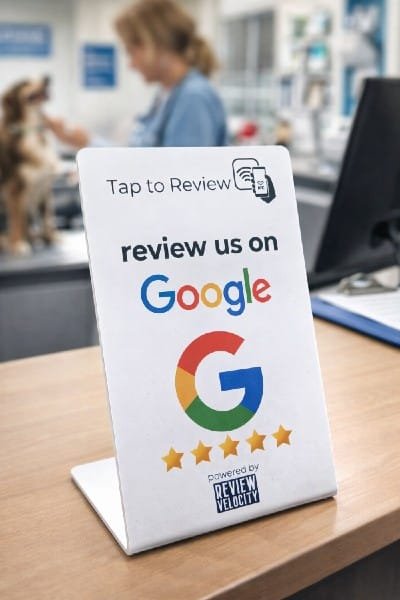
- On an NFC “tap to review” stand or card at the till
When to ask for a review
Ask while the experience is still fresh: the same day, ideally within a couple of hours. Customers who are asked in person and then sent the link straight away are far more likely to follow through than those who get a generic email a week later.
Ask every customer, not just the ones you think are happy. Google’s policies don’t allow “review gating” (only sending happy customers to Google) or offering anything in return for a review.
Frequently asked questions
Is this Google review link generator free?
Yes. It’s completely free, with no sign-up. Create links for as many businesses as you like.
What is a Google review link?
It’s a web address that opens the “Write a review” form for your business on Google. Customers tap it, choose their stars and write their review, without having to search for you first.
Does my Google review link expire?
No. The link is built from your business’s Place ID, which Google uses to identify your listing. It only changes in rare cases, such as when a listing is merged or moved, so it’s worth testing your link every few months.
Why can’t I find my business?
Your business needs a live, public Google Business Profile to appear. Try adding your town or postcode to the search. Service-area businesses that hide their address still show up by name.
Can I offer a discount or prize for a Google review?
No. Google’s policies prohibit incentives for reviews, and only asking happy customers. Ask every customer, make it easy with a direct link, and send a friendly reminder if they forget.
How do I get more people to use my review link?
Send it personally and promptly, keep the message short, and use more than one channel: a text after the visit, a QR code at the counter and a reminder by email. Review Velocity automates all three.
Free review report
How fast are you getting reviews compared with your competitors?
Get your score out of 100, your local ranking against the top 3 near you, and exactly how many 5★ reviews you need to overtake them. Free, in about 15 seconds.
No card. No sign-up.
What does Review Velocity give my business?
Gather Reviews
The core of our software is making it easy to get your customers to leave you the glowing reviews your business deserves: Tap to Review (the same tech as tap to pay), QR codes, email requests, SMS requests and WhatsApp requests. Each type of business needs a different strategy for success.
Respond to your Reviews
Respond to every review across all your platforms in one place, or let Velocity AI auto-respond for you, or use it as a template and add your own customisation. For customers leaving reviews, AI suggestions guide them on what to write so you get better, more detailed reviews automatically.
Weekly Blog Posts on Autopilot
Velocity AI writes a new blog post for your website every week, with its own image, using your reviews and your Google Business Profile as the source. Each post targets the services and towns your customers search for, so your site keeps growing in local search without you writing a word (Professional plan).
See live examplesSocial Review Sharing
Finding it difficult to know what to post on your socials every week? Review Velocity lets you share the best of your reviews across multiple social platforms automatically. What better way to get potential clients interested in your business?
Google Business Profile Management
We help busy business owners manage their Google Business Profile from the dashboard, including updating opening hours, uploading photos, updating descriptions and posting to your page. Velocity AI posts to your GBP profile.
Website Widget
Display your best reviews from your chosen review platforms on your website. It updates automatically, so your site always shows the latest social proof of just how great your business is. If you don’t have a website yet, Review Velocity will give you a free starter website.
Ranking, Performance and Strategy Insights
Our dashboard gives you your review stats and breakdowns across review platforms. It also lets you check your rankings and competitors and your Google performance, and gives you strategy insights: what’s working, what you can improve based on customer feedback, and an action plan.
Online Dashboard
All of our features are located in one easy to use dashboard. You can manage and respond to reviews, update your Google Business page, post to your page, share reviews straight to your social channels, review your weekly blog posts and show all your latest reviews on your website. It’s a way to manage your local reputation quickly and easily.
Ready to Stop Losing Customers to Competitors With More Reviews?
Start your 14-day free trial today. Get full access to everything. No credit card. No risk. No complicated setup.
Start your free trial14 Day Free Trial. No Credit Card Required
Seriously, what have you got to lose? We are currently offering a 14 day free trial and a free onboarding call to get your business set up with no fuss!