Free tool
Free Google Review Reply Generator
Struggling to keep up with review replies? Whether it’s a glowing 5-star review or a stinging 1-star one, choose positive or negative, pick what the review is about and your tone, and get a professional, on-brand reply in seconds.
Inside Review Velocity, Velocity AI replies to every review across all your platforms automatically, so your profile stays active and every customer feels heard.
Calm, professional tone
Defuse negative reviews without sounding defensive.
On-brand replies
Personalised responses that sound like your business, not a robot.
Seconds, not minutes
Reply to every review while it’s still fresh.
How to reply to a negative Google review
- Thank them for taking the time to leave feedback, even if it stings.
- Acknowledge the problem in plain words, without arguing about the details in public.
- Apologise where it’s fair, and say what you’re doing about it.
- Take it offline with a name and a phone number or email address.
- Keep it short. Three or four sentences. Future customers are reading your reply more than the reviewer is.
Avoid copying and pasting the same reply on every review, quoting the customer’s personal details, or blaming them. A calm, specific reply often does more for your reputation than the original review did damage.
Google review reply examples
Negative review: “Hi Sarah, thank you for letting us know, and I’m sorry the job ran two days late. That isn’t the standard we aim for. I’d like to put this right, so please call me directly on [number]. Alex, [business]”
5-star review: “Thanks so much, James! It was a pleasure fitting your new boiler, and we’re glad the house is warm again. Give us a shout if you ever need anything else. Alex, [business]”
Short positive review: “Thank you, Priya, we really appreciate it! See you at your next appointment.”
A review from someone who isn’t a customer: “Hi, thank you for your review. We can’t find a record of your visit under this name. Please contact us on [number] so we can look into what happened.”
Should you reply to positive reviews too?
Yes. A quick, personal thank-you on 5-star reviews shows people reading your profile that real people run the business. Mention the service or product by name where it’s natural, as that adds useful words to your profile too. Review Velocity’s Velocity AI can reply to every review automatically, or draft replies for you to approve.
Frequently asked questions
Should I respond to every Google review?
Yes. Responding to both positive and negative reviews shows customers you care, and Google has confirmed that responding to reviews helps your Business Profile stand out.
How should I respond to a negative review?
Thank them, acknowledge the issue without arguing, apologise where appropriate and offer to take it offline with a contact name or number. Keep it short and professional: future customers are reading.
How quickly should I reply to a Google review?
Within a day or two is ideal, and sooner for negative reviews. A fast, calm reply shows anyone reading that you take feedback seriously.
Can I use AI to reply to Google reviews?
Yes, as long as each reply is personal, accurate and checked. Use the generator above as a starting point, then add a detail from the customer’s visit so it doesn’t read like a template.
Can Review Velocity reply to reviews automatically?
Yes. Velocity AI can reply to every review automatically, or draft replies for you to approve, across Google, Facebook, Tripadvisor and more.
Free review report
How fast are you getting reviews compared with your competitors?
Get your score out of 100, your local ranking against the top 3 near you, and exactly how many 5★ reviews you need to overtake them. Free, in about 15 seconds.
No card. No sign-up.
What does Review Velocity give my business?
Gather Reviews
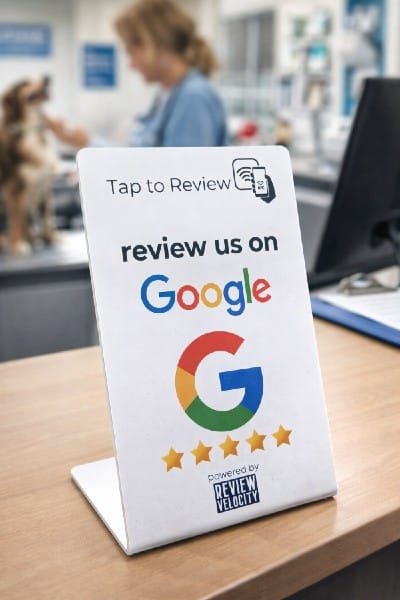
The core of our software is making it easy to get your customers to leave you the glowing reviews your business deserves: Tap to Review (the same tech as tap to pay), QR codes, email requests, SMS requests and WhatsApp requests. Each type of business needs a different strategy for success.
Respond to your Reviews
Respond to every review across all your platforms in one place, or let Velocity AI auto-respond for you, or use it as a template and add your own customisation. For customers leaving reviews, AI suggestions guide them on what to write so you get better, more detailed reviews automatically.
Weekly Blog Posts on Autopilot
Velocity AI writes a new blog post for your website every week, with its own image, using your reviews and your Google Business Profile as the source. Each post targets the services and towns your customers search for, so your site keeps growing in local search without you writing a word (Professional plan).
See live examplesSocial Review Sharing
Finding it difficult to know what to post on your socials every week? Review Velocity lets you share the best of your reviews across multiple social platforms automatically. What better way to get potential clients interested in your business?
Google Business Profile Management
We help busy business owners manage their Google Business Profile from the dashboard, including updating opening hours, uploading photos, updating descriptions and posting to your page. Velocity AI posts to your GBP profile.
Website Widget
Display your best reviews from your chosen review platforms on your website. It updates automatically, so your site always shows the latest social proof of just how great your business is. If you don’t have a website yet, Review Velocity will give you a free starter website.
Ranking, Performance and Strategy Insights
Our dashboard gives you your review stats and breakdowns across review platforms. It also lets you check your rankings and competitors and your Google performance, and gives you strategy insights: what’s working, what you can improve based on customer feedback, and an action plan.
Online Dashboard
All of our features are located in one easy to use dashboard. You can manage and respond to reviews, update your Google Business page, post to your page, share reviews straight to your social channels, review your weekly blog posts and show all your latest reviews on your website. It’s a way to manage your local reputation quickly and easily.
Ready to Stop Losing Customers to Competitors With More Reviews?
Start your 14-day free trial today. Get full access to everything. No credit card. No risk. No complicated setup.
Start your free trial14 Day Free Trial. No Credit Card Required
Seriously, what have you got to lose? We are currently offering a 14 day free trial and a free onboarding call to get your business set up with no fuss!