Most small businesses don't have a review problem. They have an asking problem.
Customers are happy. The job went well. They said "brilliant, thanks so much" on the doorstep. And then nobody asked them for a review, or somebody asked in a vague "if you get a chance…" way, and it never happened.
This guide fixes that. It gives you word-for-word scripts you can copy for asking in person, on WhatsApp, by text, by email and with a QR code or tap stand. It covers when to ask in different trades, and it ends with a plain-English table of what Google and UK law do and don't allow. That last part matters more than it used to, because a lot of the advice online, including an old post on this blog, is now out of date.
The short answer
Ask every customer, soon after a good experience, with a direct link that opens Google's review box. Keep the message short and personal. Don't offer anything in return, don't only ask the happy ones, and don't tell people what to write. Asking for an honest review is fine. Bribing, filtering or scripting reviews breaks Google's rules, and fake or hidden incentivised reviews are illegal in the UK.
Step one: get your review link
Every method below depends on one thing: a link that takes the customer straight to the "write a review" box for your business. If you send people to your website, or tell them to "search for us on Google", most of them won't bother.
There are two ways to get it:
- From Google. Open your Google Business Profile (search your business name on Google while you're logged in), then click Ask for reviews. Google gives you a short link to copy.
- From our free tool. The Google review link generator finds your business, builds the direct link and gives you a QR code plus ready-made SMS, WhatsApp and email messages.
Test the link on your own phone before you send it to anyone. It should open the review box with the stars already showing.
How to ask for Google reviews in person
Asking face to face works better than anything else, because people find it hard to say no to someone who has just helped them. The trick is to ask at the moment they're happiest, and then make it easy so they can follow through later.
At the end of a job (trades, cleaners, mobile services):
"Really glad that's sorted for you. Can I ask a quick favour? We're a small local business and Google reviews make a big difference to us. I'll send you a link by text in a minute. If you've got 30 seconds later, an honest review would really help."
At the till or reception (shops, salons, vets, cafés):
"Thanks so much, see you next time. If you've got a minute, we'd love a Google review. You can just tap your phone on that stand there, or scan the code. It takes about 30 seconds."
When a customer pays you a compliment:
"That's really kind, thank you. Would you mind putting that in a Google review? It honestly helps us more than you'd think. I'll text you the link so you don't have to look for it."
That last one is the easiest review you'll ever get. They've already written it out loud. All you're doing is pointing them to where it counts.
What to avoid in person: don't hand them your own phone or a shop tablet to leave the review there and then, and don't stand over them while they do it. Google specifically says businesses shouldn't "require or pressure users to leave ratings or write reviews while on the premises". Reviews posted from the business's own device or Wi-Fi are also more likely to get caught by Google's spam filters. Ask, give them the link, and let them do it in their own time.
Google review request templates you can copy
The in-person ask gets a yes. The follow-up message turns that yes into a review. Send it while the job is still fresh in their mind, ideally within a couple of hours.
WhatsApp is where a lot of UK customers already talk to tradespeople, salons and local services, so a review request there feels natural rather than salesy.
Hi Sarah, it's Dave from Hilltop Plumbing. Thanks again for having us round today, hope the new boiler's keeping you warm! 🔥
If you've got a minute, would you mind leaving us a quick Google review? It makes a huge difference to a small business like ours.
[your review link]
Thanks, Dave
SMS
Keep a text short enough to fit on one screen, and always say who it's from in the first few words. People ignore texts from numbers they don't recognise.
Hi Sarah, Dave from Hilltop Plumbing here. Thanks for choosing us today. Would you mind leaving a quick Google review? It really helps us: [your review link]
Email suits businesses that already email customers, such as accountants, dentists, driving schools, letting agents and anyone sending invoices. Put the request in the subject line so it doesn't look like another invoice.
Subject: Quick favour, Sarah?
Hi Sarah,
Thanks for choosing Hilltop Plumbing for your boiler installation. We hope everything's working perfectly.
We're a small, local business and most of our new customers find us on Google, so reviews from people like you make a real difference. If you have a spare minute, we'd be really grateful if you could leave an honest review here:
[Leave a Google review]
And if anything isn't right, just reply to this email and I'll sort it out.
Thanks,
Dave, Hilltop Plumbing
That "if anything isn't right" line is fine, and worth including. It gives an unhappy customer a direct route to you. What you mustn't do is send the review link only to the people who say they're happy. More on that below.
One polite reminder
Plenty of people mean to leave a review and forget. One reminder, three to five days later, usually brings in a few more. After that, leave it.
Hi Sarah, just a gentle nudge in case my last message got buried. If you have 30 seconds, a Google review would mean a lot to us: [your review link]. No worries if not, and thanks again! Dave
A few rules that make every template work better
- Use their name and yours. A message from "Dave" gets more replies than one from "Hilltop Plumbing Ltd".
- Mention the actual job. "The new boiler" or "Biscuit's vaccinations" shows it's a real message, not a mass mailing.
- Say why it matters. "It really helps a small business" is honest and it works.
- One link, one ask. Don't ask for a Google review, a Facebook review and a referral in the same message.
- Don't tell them what to write. No "please mention our emergency boiler service in Maidstone". That breaks Google's rules too (see the table below).
How to get Google reviews with a QR code or tap stand
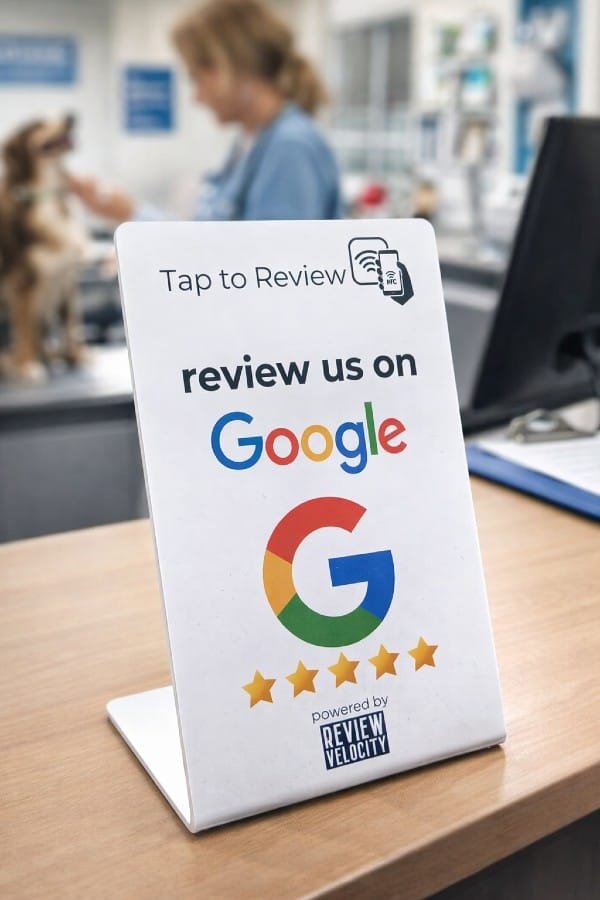
For businesses where customers come to you, such as shops, cafés, salons, gyms, vets and restaurants, a QR code or NFC tap stand on the counter does the asking for you when nobody has time to.
- QR codes work on every smartphone through the camera. Put them on the counter, on receipts, on the back of business cards, on menus, or on a sticker inside the van door. Our free QR code generator makes one from your review link.
- NFC tap stands work by tapping the phone on the stand. There's no app to open and nothing to scan, so the review box opens straight away. That makes them the fastest option for busy counters. If you've got a stand or card already, our NFC setup guide shows you how to point it at your review link.
The wording on the stand matters. Keep it to one clear instruction:
Enjoyed your visit? Tap or scan to leave us a Google review.
On its own, a stand gets ignored after a week or two. It works much better when staff point to it as part of the in-person ask: "If you've got a minute, just tap your phone on that stand."
When to ask: timing by trade
The best time to ask is when the customer has just felt the benefit of what you did. That moment is different in every business.
| Business | Best moment to ask | Best channel |
|---|---|---|
| Plumbers, electricians, heating engineers | As you finish and show them it's working, then a text the same day | In person + WhatsApp or SMS |
| Builders, roofers, landscapers | At handover of the finished job, not halfway through | In person + WhatsApp, email for bigger jobs |
| Cleaners, gardeners, dog walkers | After the second or third visit, once trust is built | |
| Restaurants, cafés, pubs | As the bill is paid, or the next morning for bookings | Tap stand or QR on the table, email for bookings |
| Hair and beauty salons | At the mirror, when they see the finished result | In person + tap stand at the till |
| Vets | When the pet is home and well, often the next day | SMS or email |
| Dentists, physios, clinics | After a successful treatment ends, not mid-course | SMS or email |
| Driving instructors | On the day they pass (or a good mock test) | In person + WhatsApp |
| Taxi and private hire firms | Straight after the journey, especially airport runs | SMS after the trip |
| Garages and repair shops | When the customer collects the car or device | In person + SMS |
| Accountants, solicitors, professional services | When the job is filed, signed or completed |
Two general rules apply everywhere. Ask within 24 hours. After a week, most people have moved on. And ask every customer, every time. Asking now and then on a good day gives you a burst of reviews followed by months of nothing. Asking every customer gives you a steady flow, which looks better to customers and to Google. We explain why in why how often you get reviews matters more than your star rating.
What's not allowed: Google's rules and UK law
This is where many businesses go wrong, often without realising it. There are two sets of rules, and they aren't the same.
Google's rules are in its prohibited and restricted content policy. Break them and Google can remove your reviews, block new ones, or put a warning on your profile.
UK law changed on 6 April 2025, when the fake review rules in the Digital Markets, Competition and Consumers Act 2024 came into force. The Competition and Markets Authority (CMA) can now enforce them directly and fine businesses up to 10% of global turnover. Its fake reviews guidance bans fake reviews, concealed incentivised reviews, and presenting reviews in a misleading way.
Allowed or not allowed?
| What you might do | UK law | |
|---|---|---|
| Ask every customer for an honest review | ✅ Allowed | ✅ Allowed |
| Send a direct review link by text, WhatsApp or email | ✅ Allowed | ✅ Allowed |
| Put a QR code or tap stand on the counter | ✅ Allowed | ✅ Allowed |
| Send one polite reminder | ✅ Allowed | ✅ Allowed |
| Reply to reviews, good and bad | ✅ Allowed (and encouraged) | ✅ Allowed |
| Offer a discount, freebie or prize draw entry for a review | ❌ Not allowed | ⚠️ Only if clearly disclosed |
| Only send the review link to customers who say they're happy ("review gating") | ❌ Not allowed | ⚠️ Risky: can mislead customers about what your reviews show |
| Ask customers to mention a staff member's name or certain keywords | ❌ Not allowed | ✅ Not banned, but must be genuine |
| Give staff a target number of reviews to collect | ❌ Not allowed | ✅ Not banned in itself |
| Pressure customers to review while they're on your premises | ❌ Not allowed | ⚠️ Could be an aggressive practice |
| Staff, family or friends reviewing your business | ❌ Not allowed (conflict of interest) | ❌ A fake review if posed as a customer |
| Buy reviews, or write them yourself | ❌ Not allowed | ❌ Illegal |
| Hide or delete negative reviews on your own website | n/a | ❌ Misleading |
"Legal" is not the same as "allowed on Google"
This is the bit almost every guide misses.
UK law doesn't ban incentivised reviews outright. Under the CMA's guidance, you can reward someone for a review as long as it's clearly labelled as incentivised. What's illegal is hiding it.
Google doesn't care whether you disclose it. Its policy says businesses must not "offer incentives – such as payment, discounts, free goods and/or services" in exchange for a review. Disclosed or not, it's banned.
So "10% off your next visit for a Google review" might not get you into trouble with the CMA if it's properly disclosed, but it's still against Google's rules and puts your profile at risk. The same goes for prize draws ("leave a review to be entered to win a hamper") and for "review us and get a free coffee" signs. For Google reviews, the only safe incentive is none at all.
We used to suggest offering "discounts, freebies, or entry into a giveaway" in an old post on this blog. That was common advice in 2024. It isn't safe advice now, and we've added a note to that post.
What is Google review gating?
Review gating means filtering customers before you ask them for a review. A typical example is a text that says "How did we do? 😀 or 🙁", where the smiley face leads to Google and the sad face leads to a private feedback form.
Google bans this. Its policy says businesses must not "selectively solicit positive reviews from customers". Some older review software was built around gating, so if you use a tool that sends only happy customers to Google, check its settings.
You can still collect private feedback. The rule is that everyone gets the same chance to leave a Google review. Ask for feedback if you like, but give every customer the review link whatever they answer.
Can employees leave Google reviews?
No. Google treats reviews from current or former employees as a conflict of interest and removes them. The same applies to family members, business partners and anyone else with a stake in the business. It's also why you shouldn't ask your mum, your mates or your other half to "just leave us a quick five stars".
Under UK law, a review that claims to be from a customer but was really written by a member of staff isn't based on a genuine customer experience, and that's what the fake review ban targets.
Staff can, and should, ask customers for reviews. They just can't write them, and you shouldn't give them a quota to hit or ask customers to mention them by name.
A simple routine that works
You don't need a complicated system. You need the same few steps every time:
- Get your direct review link and save it somewhere you can paste it quickly.
- Ask in person at the best moment for your trade, using one of the scripts above.
- Send the link the same day by WhatsApp, text or email.
- Send one reminder three to five days later if they haven't reviewed.
- Reply to every review within a few days, good or bad. Our free review reply generator helps with the awkward ones.
- Put a tap stand or QR code wherever customers wait or pay.
Do that for every customer and you'll get more reviews in three months than most local businesses get in a year.
Frequently asked questions
How do I ask a customer for a Google review?
Ask in person straight after a good experience, then send a short message the same day with a direct link to your Google review box. Use their name, mention the job and say why reviews help your business. One polite reminder a few days later is fine.
Can you incentivise Google reviews?
No. Google's policy bans offering payment, discounts, free goods or services in exchange for a review, even if you disclose it. UK law allows incentivised reviews only if they are clearly labelled, but that doesn't make them acceptable on Google.
Can I offer a discount for a Google review in the UK?
It isn't illegal if the incentive is clearly disclosed, but it breaks Google's rules, and Google can remove the reviews or restrict your profile. Hidden incentivised reviews are illegal under the DMCC Act 2024.
Are fake reviews illegal in the UK?
Yes. Since 6 April 2025, the Digital Markets, Competition and Consumers Act 2024 bans fake reviews, concealed incentivised reviews and presenting reviews in a misleading way. The CMA can enforce the rules directly and fine businesses up to 10% of global turnover.
What is Google review gating?
Review gating is asking customers how they felt first and only sending happy customers to Google, while unhappy ones go to a private form. Google bans it as selectively soliciting positive reviews. Every customer must get the same chance to leave a review.
Can employees leave Google reviews for their own business?
No. Google treats reviews from current or former employees as a conflict of interest and removes them. A staff member posing as a customer would also count as a fake review under UK law.
How can I get more Google reviews for free?
Ask every customer, every time, using a free direct review link, a QR code and copy-and-paste messages by WhatsApp, text or email. The Google review link generator creates all three in a couple of minutes.
The bottom line
Getting more Google reviews isn't about tricks. It's about asking every customer, at the right moment, in a way that takes them 30 seconds. Do it consistently and do it honestly, and you'll build the kind of review profile that wins work, with nothing that Google or the CMA could object to.
The hard part is remembering to do it every day when you're busy.
Let the asking happen automatically.
Review Velocity sends review requests by WhatsApp, SMS and email after every job, so every customer gets asked without anyone having to remember. Add a tap-to-review stand on the counter and you're covered both ways. Get your free review report or start a 14-day free trial, with no card needed.